 stickdriftest
If you are comparing controllers, “TMR” and “Hall effect” will usually appear near promises about precision or drift. They describe sensor technology, not the entire controller. Neither label tells you how the sticks return to center, how a game feels or how good the firmware is.
This is a technology explanation, not a ranking of controllers we have bench-tested. There are no invented latency figures, lifespan predictions or battery-life comparisons here.
TMR vs Hall effect: what is different?
Both are magnetic sensing approaches. In a magnetic joystick design, a moving magnet and a sensor can report position without the sliding electrical contact used by a traditional potentiometer.
A Hall element produces a small voltage in response to a magnetic field; supporting circuitry turns it into a usable signal. TMR stands for tunnel magnetoresistance and uses a different magnetic sensing mechanism. It is not simply a software setting you can enable on an existing Hall-effect controller.
Texas Instruments discusses sensitivity, power and sensing-direction differences at the component level. Those properties depend on the selected part and design. They are not proof that every TMR gamepad is more accurate or uses less power than every Hall-effect gamepad.
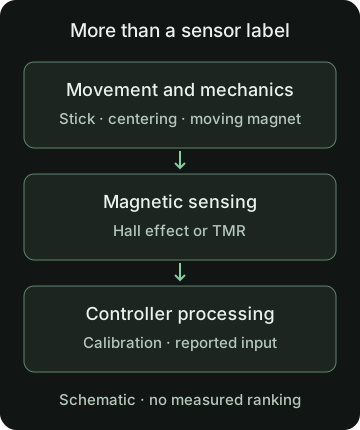
What the sensor label does not prove
| Question | What to compare |
|---|---|
| Will it feel precise? | Stick mechanics, response curve, deadzone, calibration and behavior in your game. |
| Will it have less delay? | Measurements of the complete controller and connection, not the sensor acronym. |
| Will the battery last longer? | The whole product under stated conditions, including radio, lighting and other features. |
| Will it last longer? | Mechanical design, support, repair options and credible long-term evidence. |
Also check what a specification measures. A sensor resolution figure is not automatically the number of distinct useful positions you will receive through a game or browser. Processing and output formats sit between the component and the result.
Can Hall effect or TMR sticks still show drift?
They can still report off-center input. Avoiding a sliding sensing contact does not remove the centering mechanism, assembly tolerances, calibration or software processing from the controller.
That does not mean magnetic sensing has no benefit. It means the benefit should be described accurately: removing one kind of contact wear is not the same as guaranteeing every part of a controller forever.
A drift symptom can have several causes. A browser cannot look inside the controller, identify its sensor type from an axis value or prove that a particular component is damaged.
What to check before buying
- Compatibility: confirm your exact console, PC or mobile setup, supported connection and any required software.
- Stick feel: consider tension, grip, travel and whether fine movements suit your games. A component specification cannot describe all of that.
- Settings: look for clear information about deadzones and response curves. A large built-in deadzone can make a stick look quiet without telling you much about its physical centering.
- Evidence: prefer reviews that explain the tested model, firmware, connection and method. Do not compare two unexplained screenshots as if they were controlled measurements.
- Support: read the warranty, return terms and repair options. A replaceable part is useful only if the replacement and procedure are appropriate.
Check the controller you actually have
Use the button and axis tester to confirm visible inputs, then run an untouched stick drift check. Save a baseline with the model, connection and settings noted. Do not compare a corrected preview from one controller with uncorrected readings from another.
Then return to the game and try slow, deliberate movements. The deadzone guide explains why a quiet center and good fine control are different questions. Your own repeatable observation is useful; it still cannot predict years of durability or establish a universal winner between sensor technologies.
Sources and scope
This guide explains the concepts and our browser tool. It is not a hands-on compatibility report or a diagnosis of your controller.
- Texas Instruments: What is a Hall-effect sensor?How a Hall element and supporting circuitry convert magnetic information into a useful signal. Not a controller benchmark.
- Texas Instruments: Hall-effect sensor myths and TMR comparisonDiscusses TMR sensitivity and Hall-effect sensing capabilities. Component/application examples do not establish joystick latency, battery life or durability.
Our diagrams are original illustrations. Example values are made-up teaching examples, not recorded controller results.
PUT IT INTO PRACTICE
Check your controller inputs
No download or account. Controller readings stay in your browser.
Check your controller inputsRelated guides